
For Canadian players who prefer a phone or tablet, the practical question is whether Betscore requires an APK or can be used directly in a browser. The available information describes a responsive mobile website for iOS and Android, with casino games, live casino, sportsbook, promotions, account tools and cashier functions available without installing a native casino app. The betscore apk search term may therefore lead readers to an informational page, but the key point is simple: mobile access is browser-based rather than dependent on an app-store download.

How mobile access works
Betscore is designed to adapt to a phone or tablet screen. Instead of opening a separate application, players use a mobile browser and visit the operator’s website. The layout adjusts for touch controls, smaller screens and portrait viewing, allowing the main account areas to remain available while travelling or relaxing at home. The same general service is presented through the browser rather than a standalone casino installation.
Mobile access covers more than slots. The source material describes casino titles, live-dealer tables, sportsbook markets, live betting, promotions, account settings and cashier functions as part of the mobile experience. That makes the browser version useful for players who move between casino and sports sections, although the precise display can vary according to the device, browser and current site design.
A browser-based arrangement also avoids the need to search for an official file from an unknown website. Readers should be cautious with unofficial APK downloads, particularly where a file requests unusual permissions or comes from a source that cannot be verified. The documented mobile option does not require that type of installation, so using the responsive website is the more clearly supported route.
Creating a convenient home-screen shortcut
Although there is no need to install a native app, a browser shortcut can make the service feel more accessible. On Android, the browser menu includes an “Add to Home screen” option. Selecting it creates an icon alongside other apps, while the actual site continues to open through the browser. Menu wording can differ slightly between Android versions and browser brands.
On an iPhone or iPad, the shortcut is created from the browser’s Share menu. The “Add to Home Screen” command places an icon on the device, giving quicker access without requiring an App Store download. This is a shortcut to the website, not evidence of a separate native application, and deleting it later does not remove an account or change account information.
Before saving a shortcut, check that the browser is displaying the intended operator website and that the connection is secure. A shortcut should not be created from a pop-up, advertisement or unfamiliar mirror. Keeping the browser updated and using the device’s normal security settings provides a sensible baseline, while readers should still review the operator’s own access and account guidance if the shortcut stops working.
What can be done from a phone
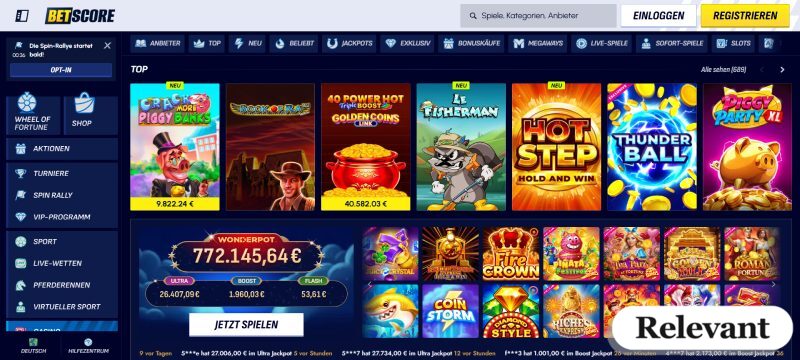
The mobile website is intended to support the principal features available through a desktop browser. Casino navigation includes categories such as popular, new, live games, instant games, jackpots, slots and table games. A provider filter can also help narrow a large catalogue. Demo play is available for many titles, while real-money play requires an account and login.
Live casino content is especially suited to a larger phone screen or tablet when a stable connection is available. The listed sections include roulette, blackjack, baccarat, dice, poker and game-show formats, alongside streamed tables from live-oriented suppliers. Sports users can also move between pre-match and live betting areas, but the availability of individual events and markets can change.
Promotions, the profile area and the cashier are also described as usable on mobile. That does not mean every page will look identical across devices. A smaller display may require scrolling, rotating the screen or opening a menu before a feature becomes visible. Players should read the full terms of any offer and confirm the selected transaction details before submitting an action.
Login, account continuity and troubleshooting
Mobile sessions use the existing account credentials. The registered username or email and password or PIN are case-sensitive, so careful entry matters on a compact keyboard. The same account, balance and login are used across desktop and mobile browser sessions. Moving from one device to another does not create a separate mobile profile, provided the player uses the correct account.
If a password is forgotten, the login screen provides a recovery option. The registered email address is entered so that a reset message can be sent. When an expected message does not arrive, support can assist. For failed logins despite apparently correct details, the operator recommends clearing browser cookies and cache or trying another browser.
Persistent technical problems should be reported to customer support with a screenshot of the error where possible. Support is described as available 24/7 through live chat and email, with the Help Centre dividing assistance into account, verification, technical, casino, sportsbook, promotion and withdrawal topics. Never share a password in a support conversation, and verify the destination before entering account information.
Mobile payments and responsible use
The mobile browser can be used for cashier functions, but payment availability depends on the account, transaction type and current cashier display. CAD is supported for Canadian accounts, and the listed methods include Interac e-Transfer, Visa, Mastercard, Skrill, Neteller, Neosurf and cryptocurrencies including Bitcoin, Ethereum and Tether. Exact minimums and limits should be checked at the time of payment.
Interac deposits are described as fee-free, while processing speed and withdrawal timing vary by method. Not every deposit method can receive a withdrawal, and an alternative option may be required. Withdrawable funds must be in the cash balance, and wagering requirements must be completed before a payout request. Verification may also be required before a withdrawal is processed.
Phone access makes it easier to check balances and promotions, but convenience should not replace control. The account includes options to request a temporary break or self-exclusion through support. The service states that underage registration is prohibited. Anyone who feels gambling is becoming difficult to manage should use the available controls and seek independent support rather than treating mobile access as a source of income.
FAQ
Is a Betscore APK required on Android?
No. The documented mobile option is a responsive website that works in an Android browser. An “Add to Home screen” shortcut can provide quick access, but it is not a separate APK installation. Avoid unofficial files and rely on the operator’s supported website and account guidance instead.
Can the mobile website be used on an iPhone?
Yes, the service is described as operating through a responsive browser website on iOS. An icon can be added from the browser’s Share menu. This shortcut opens the website and does not represent an App Store application or create a separate account.
Will my balance remain available across devices?
The source material states that the same account, balance and login are used across desktop and mobile browser sessions. Use the registered credentials, keep them private and confirm that you are on the intended website before entering account details or accessing cashier functions.